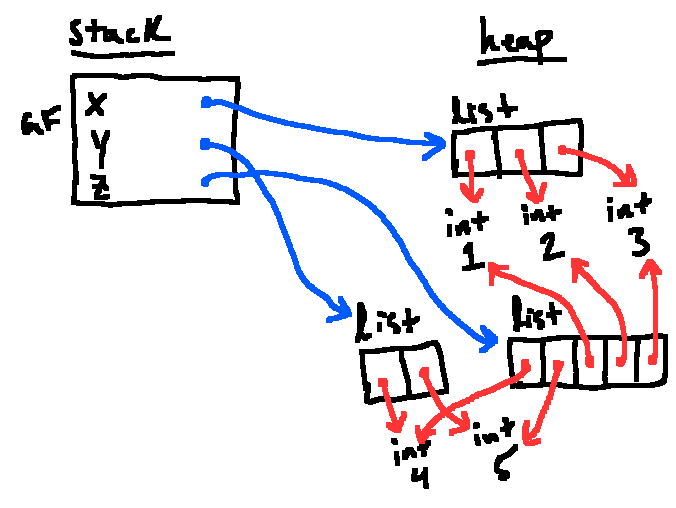
Introduces the idea of an environment diagram as a means of illustrating the stack and heap, as well as associations between variables and objects via arrows. Additionally, we introduced lists and tuples, and the technical quirks associated with them.
See also Fun With Functions (functions + frames in the environment model).
Introduction
6.101 has three goals:
programming - being able to analyze and break down problems
coding - translating plans into code
debugging - error-correction
In general, we want to focus on controlling complexity: the ability to manage large projects that don’t fit into the RAM that is our brain. A large aspect of this is being able to understand the system we are working with at a high level; without understanding of the underlying process, there is no hope of being to piece together lower-level elements.
Example
What does the following code output?
functions = []for i in range(5): def func(x): return x + i functions.append(func)for f in functions: print(f(12))
The result of this code should be a surprise. Unexpected things can happen in code, and it’s our job to develop a coherent model that describes Python’s behavior in a way that makes sense to us.
Environment Diagrams
Objects are always stored in memory; Python, like all languages, needs a way to link names with the objects it has stored in memory. Hence, we have two categories of considerations:
Keeping track of objects
Keeping track of names we use for those objects
Environment Diagrams serve to keep track of these in two regions:
heap - where objects are stored
stack - where we keep track of names
Organized into frames, which store mappings from names to objects
Where we start execution is a single frame called the global frame
Example
x = 307x = 308y = xy = 342
Python works sequentially, so we start with x=307, where = is called the assignment statement, performed by evaluating the right side of the equals sign and then associating that with what’s on the left. We first store our integer on the heap:
Then associate that integer with the name x in the global frame:
Notation
x is called a variable that is bound to the object. We’ll call the arrow a reference.
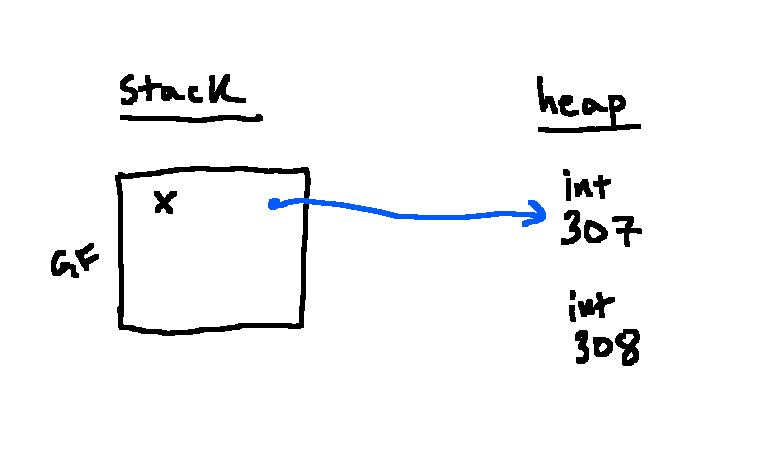
To evaluate x, we follow the arrow to the object it points to. We follow the same procedure for the second line:
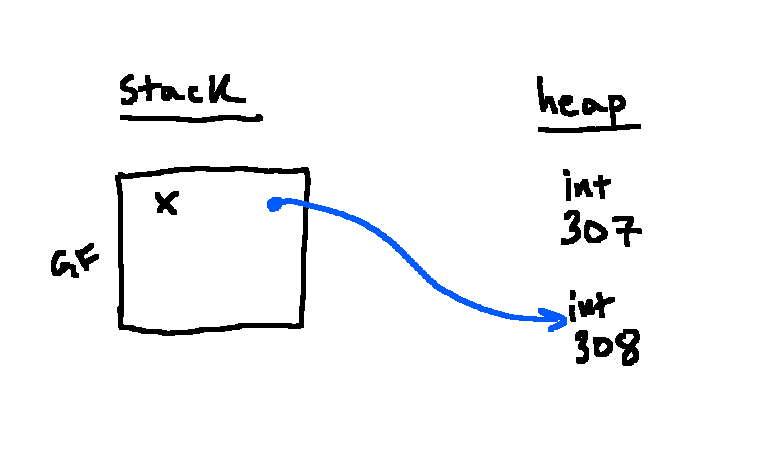
But notice that we assign x to a different number. Hence, we must adjust our reference:
Note that 307 no longer has a reference, so we now “garbage collect” to save memory and remove it from the heap:
Problem
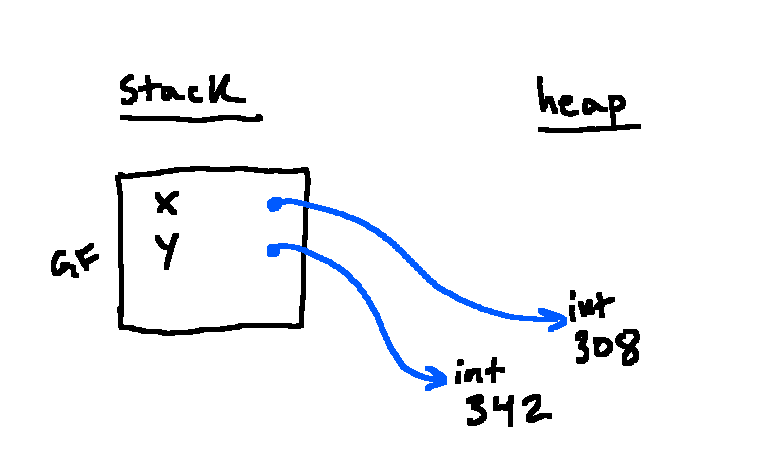
In the third line, will y point to a new instance of 308 in the heap or the same one?
Solution
The same. y=x is an assignment statement, so we assign y to whatever x was referencing
For those curious, the final diagram will look like this:
Lists
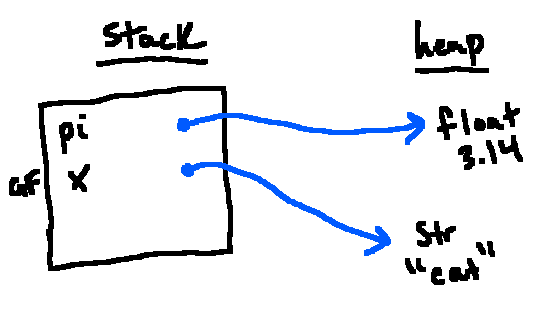
We can draw any object type in our environment diagrams:
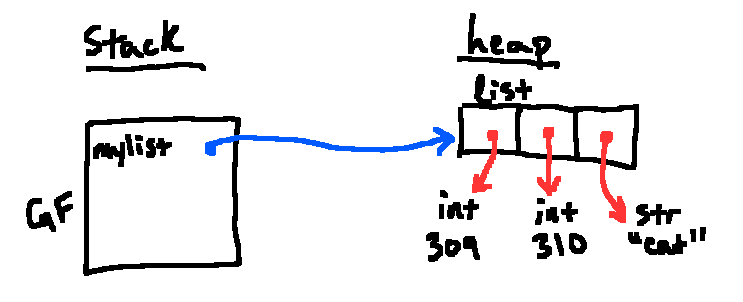
But what if we store multiple elements in an object? These are called collections, which include lists, sets, tuples, and more. Though the diagram becomes more complex, since a collection is an object, we store the information as follows:
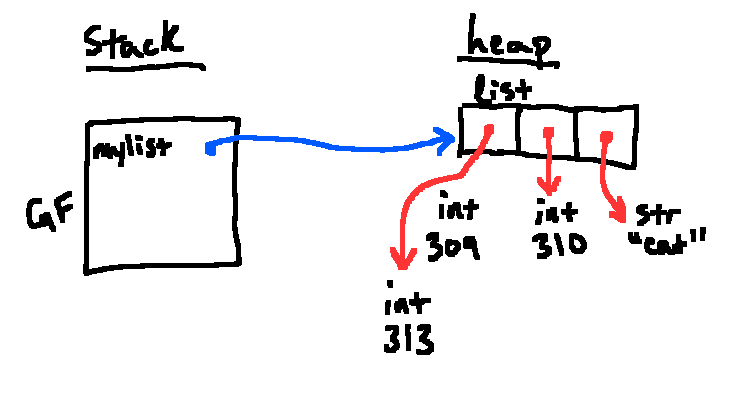
myList = [309, 310, "cat"]
Importantly, when Python makes a list, the contents (items) are stored as references to other objects, not objects themselves. In the example above, Python sees a literal representation of a list with 3 elements. When we get a new list object, the references in that list point to the results of the subexpressions, namely 309, 310, "cat". Since each is a literal expression, we can evaluate each one to give a new object on the heap.
This “list of references” model shows up in Image Processing: images are stored as a row-major list of pixel values, and most operations are just careful indexing and mutation.
Note
If any element in the brackets had not been literals (i.e. reference to variable), we would figure out where the references should point. For instance:
x = 311y = [x, 312]
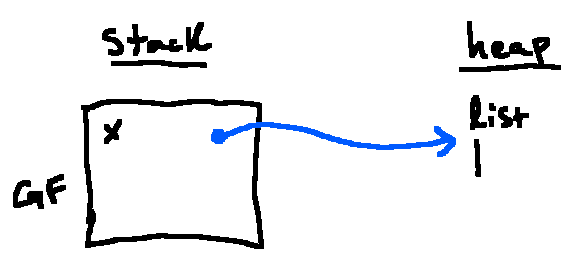
We also draw empty lists as a single vertical line, in reference to the left side of a box:
Operations
We will use the following example:
myList = [309, 310, "cat"]
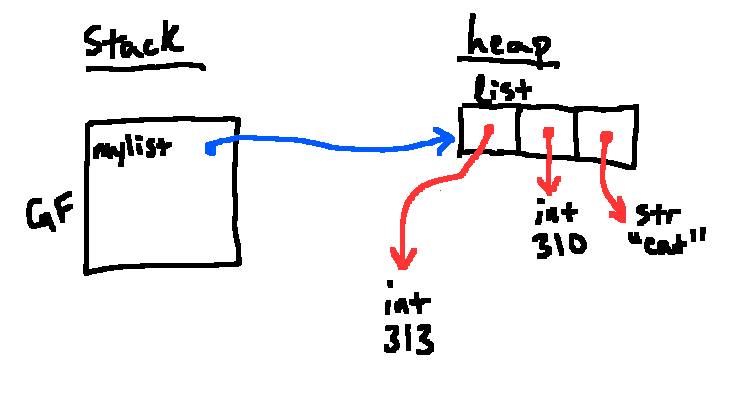
We can index elements in a list as follows: myList[0]→ 309. Lists are also mutable, so we can set myList[0] = 313 which functions as an assignment statement. The new environment diagram would look as follows:
And after garbage collection:
Some common error messages include:
IndexError: list index out of range
TypeError: list indices must be integers or slices, not …
TypeError: ’…’ object is not subscriptable
This occurs when we use square brackets to index into (subscript) an object that doesn’t support the operation
We can also find sublists by slicing: x[start:end:step] gives the elements from start to the element before end, counting by steps.
Notation
x[::-1] makes a new list in reverse order
The append method lets us add items to the end of a list. Note that append always returns None while mutating the list.
extend lets us add multiple elements to the end of a list.
insert(N, val) adds a new reference such that val is now at index N.
pop lets us remove an item based on its index.
remove lets us remove an item based on its value. The earliest occurence is removed.
Python also has the + operator on lists, which is used for concatenation, which makes a new list with all the references on the left hand side followed by those on the right.
Example
x = [1, 2, 3]y = [4, 5]
Running z = y + x starting from this point would produce a new list containing 5 elements (the 2 elements from y, followed by the three elements from x).
The end result is similar to that of extend, though instead of modifying y in-place, we get a new list.
Python also has += for lists, where a += b behaves equivalently to a.extend(b); it mutates a rather than making a new list.
Note
a += b is not the same as a = a + b.
Tuples
Like lists, tuples are ordered collections that are stored as references to objects on the heap. However, they are immutable: we cannot change references after we build a tuple, nor can we add/remove items.
One can create a tuple by listing expressions not surrounded by square or squiggly brackets. For instance:
x = (1, 2, 3)y = 7, 8, 9
Note
Parentheses do not make a tuple, i.e., (7) is still an integer. However, (7,) or 7, both are tuples.

 Then associate that integer with the name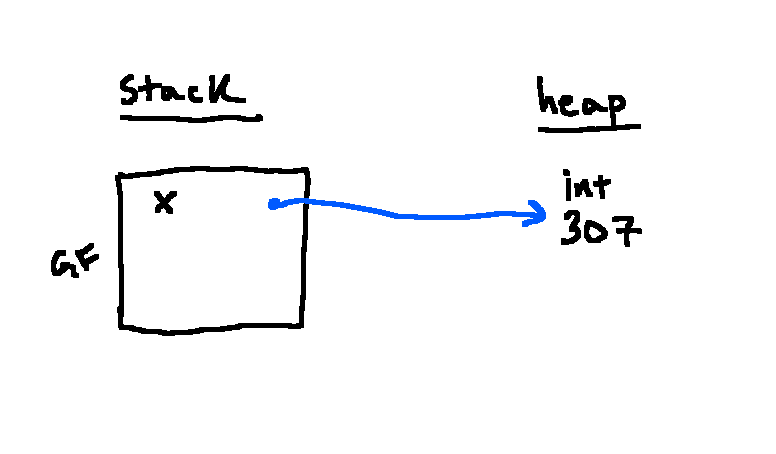
 But notice that we assign
  Note that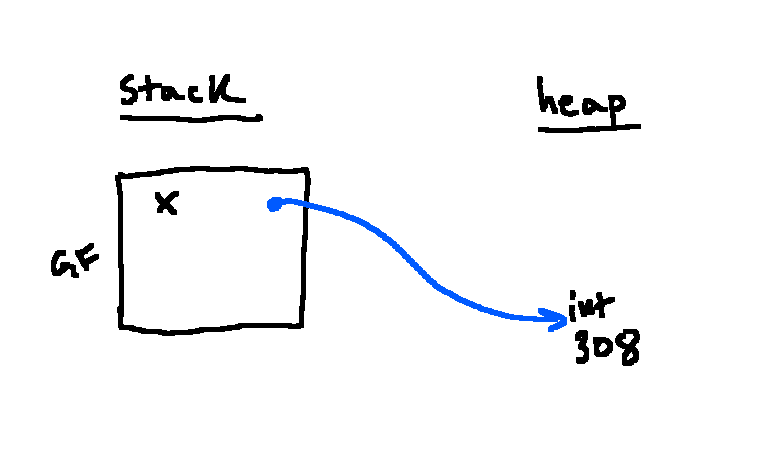
 But what if we store multiple elements in an object? These are called collections, which include lists, sets, tuples, and more. Though the diagram becomes more complex, since a collection is an object, we store the information as follows:
 Importantly, when Python makes a list, the contents (items) are stored as references to other objects, not objects themselves. In the example above, Python sees a literal representation of a list with 3 elements. When we get a new list object, the references in that list point to the results of the subexpressions, namely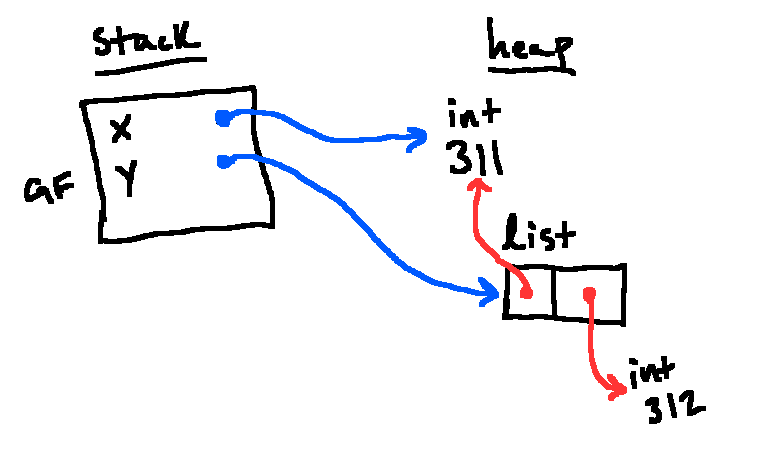
 And after garbage collection:
 Some common error messages include:
Running